ASUS ROG XG Station 3 Is a Thunderbolt 5 eGPU Dock for Laptop Gamers Who Want Desktop Power
By AS Gaming EditorialNovember 05, 20265 min readPC
Source: ASUS ROG (press kit)
What the ROG XG Station 3 Actually Does
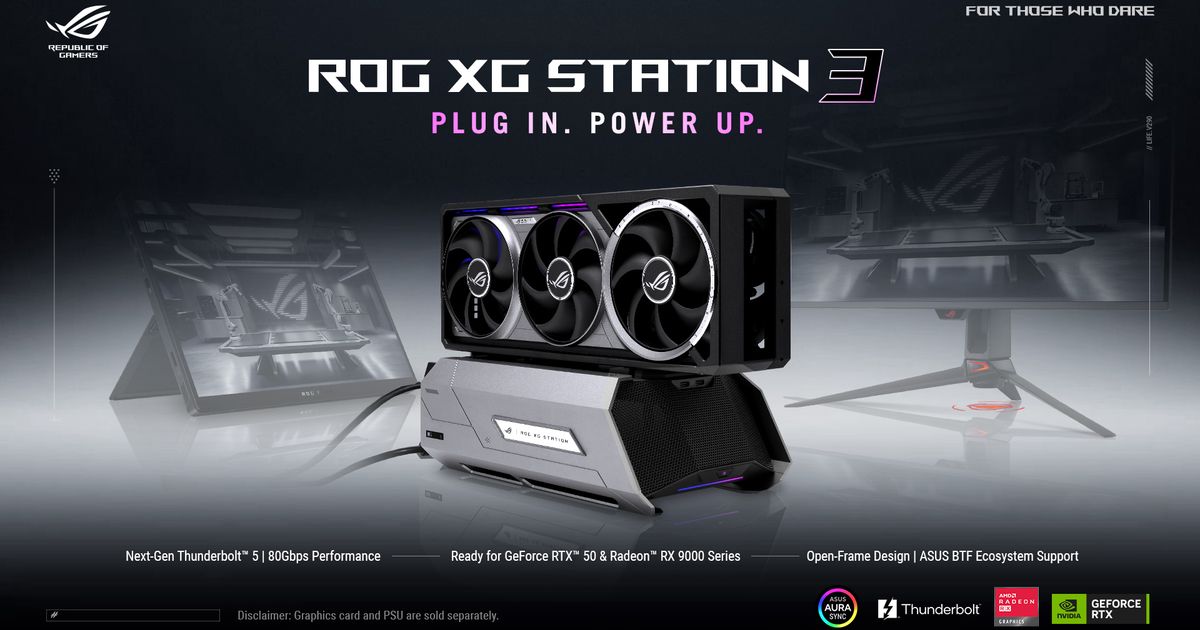
ASUS Republic of Gamers has officially announced the ROG XG Station 3, an external graphics card dock that lets a laptop run a full desktop GPU over a single Thunderbolt 5 cable. The official ASUS press release landed on November 4, following the dock's first appearance at Computex 2025, and it answers the main question laptop gamers have been asking since that debut: is this a real product, and what exactly does it do?
The short answer is that it is a modular, open-frame dock. You install a desktop graphics card of your choice, connect the dock to a compatible laptop over Thunderbolt 5, and the laptop gets desktop-class graphics without becoming a desktop. The open-frame design keeps the card visible and gives it unobstructed airflow, which is a deliberate choice: this is a showpiece as much as a peripheral, and ASUS knows its audience likes to see the hardware.
The headline spec is the connection itself. Thunderbolt 5 delivers up to 80Gbps of bidirectional bandwidth, twice Thunderbolt 4, with a Bandwidth Boost mode reaching 120Gbps for high-volume video traffic. One honest caveat: Thunderbolt 5 limits PCIe tunneling to 64Gbps, so real-world gaming performance will sit slightly below the same card in a desktop motherboard. That gap is the price of the form factor, and buyers should expect it rather than be surprised by it.
Which Graphics Cards the ROG XG Station 3 Supports
ASUS lists four supported families: NVIDIA GeForce RTX 50 Series, NVIDIA RTX PRO 6000 Series, AMD Radeon RX 9000 Series, and Intel Arc. The dock accepts cards up to 361 mm long, which covers nearly every flagship on the market, and it includes a GC-HPWR slot for ASUS BTF 2.5 cards. BTF cards draw power through the slot instead of a visible cable, and ASUS names two examples: the TUF Gaming GeForce RTX 5080 BTF OC Edition and the ROG Astral GeForce RTX 5090 BTF Edition. With a standard card, the PCIe power cable stays visible, which is fine but less tidy.
One detail that will shape buying decisions: the dock does not include a power supply. You install your own standard SFX or SFX-L unit, sized for the card you pick. That keeps the dock itself cheaper and lets you match the PSU to your GPU, but it also means the total cost is dock plus PSU plus graphics card, and first-time buyers should budget for all three. ASUS says the dock works with any laptop that has a Thunderbolt 5 or Thunderbolt 4 port, with backward compatibility for Thunderbolt 4, though you will get the full bandwidth only on Thunderbolt 5.
Ports, Charging, and the Hub Side of the Dock
The XG Station 3 is also a connectivity hub, and this is where it earns its desk space beyond gaming. The upstream Thunderbolt 5 port delivers up to 140W of USB Power Delivery to the laptop, so one cable handles graphics, data, and charging. A downstream Thunderbolt 5 port supports up to three 4K displays via daisy chaining and provides up to 36W of charging for devices. Two front-facing USB-C ports at 10Gbps give easy access for keyboards, mice, storage, and other gear.
That hub role matters because the dock's real buyer is probably not someone choosing between this and a desktop. It is someone who already owns a good thin laptop, wants to play demanding games at a desk, and does not want a second machine. For that person, one cable that turns a laptop into a full battlestation, with triple 4K monitor support, is a compelling pitch, and it is the same audience ASUS has chased since the original XG Station in 2007.
Who Should Buy It, and What Is Still Unknown
The honest buying advice is to wait for two missing facts: price and a release date. ASUS has announced neither, and the dock is an announcement, not a product you can order today. When it does go on sale, the math to do is dock plus PSU plus GPU versus a budget desktop with the same card. The dock wins on desk space and on keeping one machine for everything. The desktop wins on raw performance per dollar and on upgrade simplicity.
There are also alternatives worth knowing. OCuLink eGPU docks offer higher effective bandwidth for gaming but give up Thunderbolt's charging and hub features, so the choice comes down to whether you value a single-cable desk or maximum frames. ASUS's own compact machines, like the ROG NUC 16 Phantom Blade Zero Edition, and its high-end displays, covered in our ROG Strix XG27AQNGV look, show the ecosystem this dock is designed to sit inside.
For now, the ROG XG Station 3 is the most interesting eGPU announcement in years because Thunderbolt 5 finally makes the concept feel less compromised. If ASUS prices it sensibly and the PSU situation is clearly explained at retail, it could be the dock that makes laptop-first gaming setups genuinely viable. Until then, it is a well-specified promise, and promises do not run games.